Small Warehouse
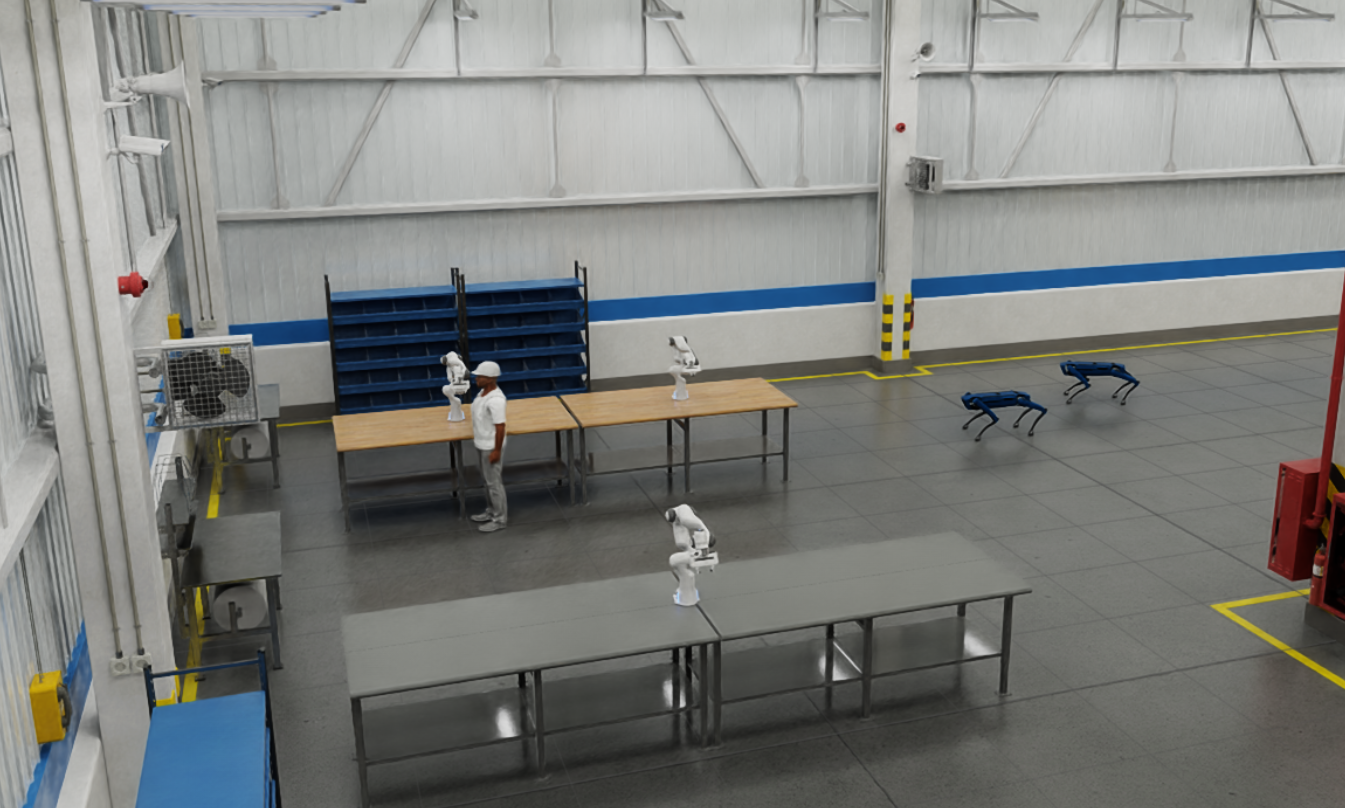
Small Warehouse is a robotics simulation project built on NVIDIA Isaac Sim. It simulates a warehouse environment where a team of robots with Spot quadrupeds and Franka robotic arms cohabit. There is also a sim_worker which can be used to simulate the interaction with humans. Those actors can collaborate to create orchestrated logic and custom behavior layers using paraflow and the Paranet.
Prerequisites:
Isaac-sim (Compatible with 4.5 or 5.0):
- Complete and understand Nvidia's hello world and hello robot tutorials.
- Make sure you can execute Nvidia's Isaac Sim's Python Environment
Otonoma:
-
Install the Python Paranet SDK for Isaac-sim:
Installation Command (For Isaac Sim 5.0):
- Linux:
cd ~/.local/share/ov/pkg/isaac-sim-5.0.0/
./python.sh -m pip install paranet_agent - Windows:
cd C:\Users\<YourUser>\.local\share\ov\pkg\isaac-sim-5.0.0\
python.bat -m pip install paranet_agent
- Linux:
Note: Make sure to use the path to your Isaac Sim Python Environment.
Version Requirements:
- Python SDK: v2.0.2 or higher
- Para: v0.21.0 or higher
Setup:
-
Create and new folder and initialize with
para init --template small-warehouse. -
Navigate to the root of the init'ed
small-warehouse/simulationdirectory.- Result should look like:
 simulation/
 ├── app.py # Entry point for the simulation
 ├── config/
 │ └── sim_config.yml # Scene and actor configuration for standard mode
 │ └── headless.yml # Scene and actor configuration for headless mode
 │ └── low_res.yml # Scene and actor configuration for low resolution mode
 ├── warehouse/
 │ ├── warehouse.py # Main simulation world logic
 │ ├── franka_isaac.py # Franka state machine & behavior
 │ ├── franka_actor.py # Franka actor interface (Paranet)
 │ ├── spot_isaac.py # Spot robot controller logic
 │ ├── spot_actor.py # Spot actor interface (Paranet)
 │ ├── sim_worker_isaac.py # Sim Worker logic
 │ ├── sim_worker_actor.py # Sim Worker interface (Paranet)
 │ ├── math_util.py # Math functions helper
 │ └── vfh.py # Navigation using Vector Field Histogram functions helper
- Result should look like:
Running the Demo:
- Open a terminal at
small-warehouseroot - Run the following commands to build the Paranet Docker project:
para docker deploy node
para docker deploy package - Observe the output to ensure the core Paranet services are online. This can also be monitored in the Docker extension.
- Open the provided Paracord link from the terminal:
- http://localhost:3023
- This is where we will later trigger skills.
- Use Isaac Sim's Python Environment to execute
app.pyin the simulation folder:- Linux:
~/.local/share/ov/pkg/isaac-sim-5.0.0/python.sh simulation/app.py - Windows:
C:\Users\<YourUser>\.local\share\ov\pkg\isaac-sim-5.0.0\python.bat .\simulation\app.py
- Linux:
Note: Or use the
ISAACPY45shortcut created in Omniverse Integration Guide
Note: You can set the config file you want to run the app with by adding it at the end of the file:
~/.local/share/ov/pkg/isaac-sim-5.0.0/python.sh simulation/app.py --config low_res.yml
The default will be :
sim_config.yml,low_res.ymlis recommended for less powerful computers.
- In Paracord, navigate to the "Actor Hub" tab and find all the available actors
- Test actor skills, such as:
franka_1 -> disablespot_2 -> gotosim_worker_manager -> Work in Bench
Note:
para docker deploy packageinitialize the package defined onparanet.yamlbut other packages that uses the python SDK are also initialized when Isaac Sim is launched.
Next Steps
Using the implemented skills, one can implement some autonomous behaviors like having the spots patrol the warehouse and monitor the Franka robots. That can alert the Sim Worker to repair a Franka when it is disabled.
Another possibility is to create collaborative logistics workflows where Spots use navigation skills to transport materials between workstations, while Franka robots handle precision assembly tasks. The Sim Worker can coordinate the workflow by monitoring status and directing robots to optimal positions based on distance calculations and current workload distribution.
Configurable Setup
Inside config/<config_file>.yml, you will see something like this:
headless: false
low_res: true
sim_actors:
robot_arm:
    - name: franka1
    position: [0.0, 0.0, 0.0]
robot_quadruped:
    - name: spot1
    position: [0.0, 0.0, 0.0]
    color: blue
You can add more Frankas or Spots, define target positions, and customize names.
Common Issues:
Docker Network Error:
If you run para docker deploy node and get the following error:
failed to create network hello-robot-network: Error response from daemon: invalid pool request: Pool overlaps with other one on this address space
Failed to start paranet.
Run the following command to remove unused Docker objects:
docker system prune
Demo
https://github.com/user-attachments/assets/152bb964-eaf6-4feb-a27c-4661b69ba931